



Field Data Capture
Capture Once in the Field. Use the Data Across Your Business.
Lumber captures more than hours.
Give crews one simple way to record time, quantities and other jobsite information — and connect that data to the systems that need it.

Hours Worked
Capture time against the right project, task, cost code, or other labor tags.
.avif)
Quantities Completed
Record production units and quantities completed directly from the jobsite.
.avif)
Foreman Daily Reports
Give project teams a clearer picture of what is actually happening in the field.
.avif)
Jobsite Information
Collect equipment checks, material information, photos, signatures, and more.
Field to Finance Sync
From the jobsite to your business systems
One field entry. Multiple downstream uses.
FIELD
.avif)
Hours worked
.webp)
Quantities completed
.webp)
Daily reports
.avif)
Equipment run time
%201.avif)

Capture
Organize
Validate
Sync
BUSINESS SYSTEMS

Payroll
Time data flows directly into payroll.
.avif)
Project Management
Actual labor time and quantity can flow into project management systems.
.avif)
Actuals & Job Costing
Connect labor, quantities, and field activity to understand work performed and costs.
.avif)
ERP & Accounting
Connect field activity with downstream financial workflows.
.avif)
Compliance
Keep digital records organized, accessible, and audit-ready.
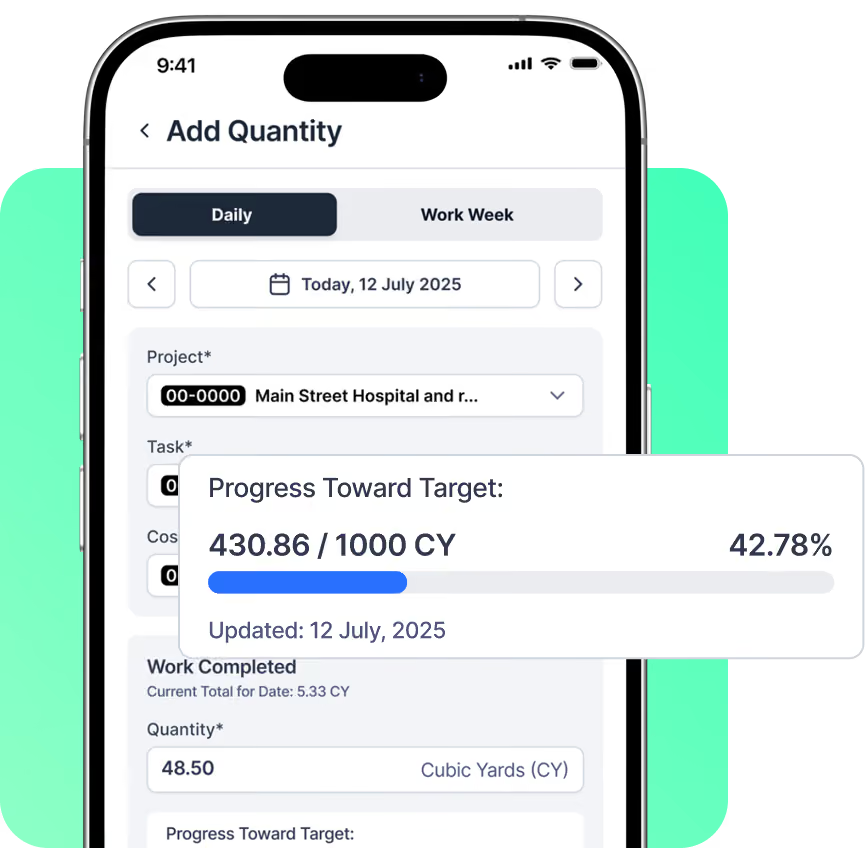
Capture More Than Time
Every Hour, Accounted For
Time tells you how many hours were worked.
Quantity tells you what those hours produced.
With Lumber, crews can capture quantities and other metrics alongside their time. Track the information that matters to your projects and compare actual work against planned work.
.avif)
Labor Tags
Tag field hours by task, cost code, or class — matched to how your project budget is already structured, so the numbers land exactly where your PM tool expects them.
Connect Quantity to Hours
Bring field actuals together to give teams a clearer view of work performed and hours logged.
.avif)
See the Full Picture
Combine labor hours with production data to understand not just how much time was spent — but what was accomplished.
Build Custom Templates
Mobile-first Smart Templates
Embedded into your workflow. Completed on-site.
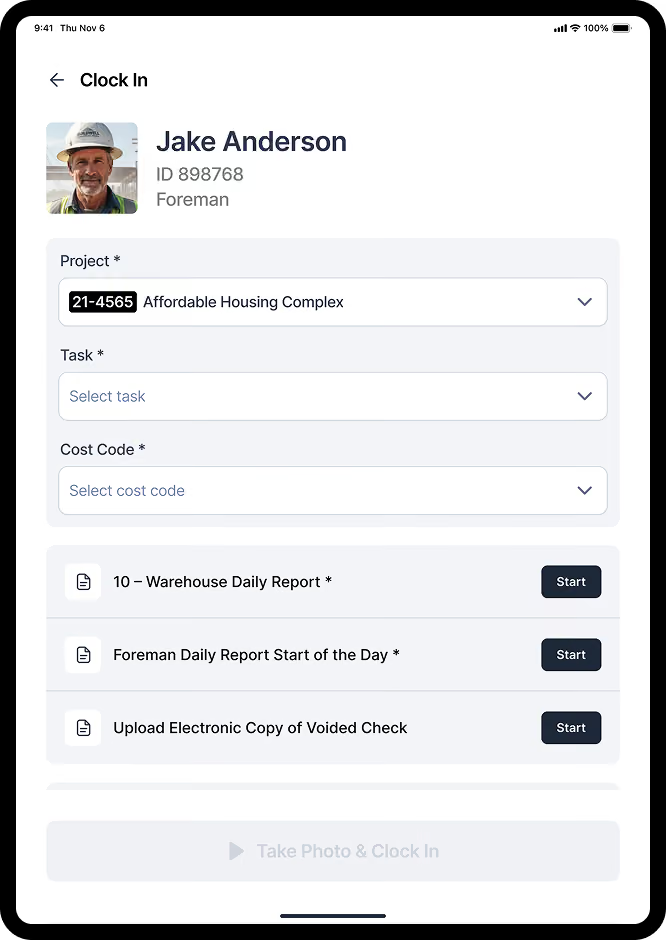
Create digital templates for the information your crews collect every day, from daily reports and documentation to equipment checks, and material receipts.
Build templates around the way your teams actually work, without relying on paper or one-off spreadsheets.
.avif)
Build & Deploy Quickly
Create custom templates with an intuitive drag-and-drop builder. Add required fields, photos, signatures, and more.
.avif)
Make Templates Work Smarter
Use conditional logic to show the right questions based on previous answers.
.avif)
Capture Data Where Work Happens
Crews can complete templates directly from their mobile devices, including when connectivity is limited.
.avif)
Keep Every Record Connected
Organize completed templates and field information in one place for easier access, reporting, and follow-up.
Capture Once. Eliminate Double Entry.
Stop moving information from the field to the office by hand
Better visibility from the field to the office.

Capture
Crews enter time, quantities, and other field data once.
.avif)
Connect
Lumber organizes the information and connects it to the workflows and systems that need it.
.avif)
Act
Backoffice teams get the data they need without waiting for manual updates.
Built For The Way Construction Works
Capture data daily, weekly, or whenever the work happens
Different teams measure work differently. Lumber gives you the flexibility to configure field data capture around your projects and workflows.
.avif)
Daily Field Capture
Give foremen and crews a simple way to record hours, quantities, and jobsite information every day.
Weekly Reporting
Collect quantity information on the cadence that works for your teams.
.avif)
Project-Specific Data
Configure the fields and labor tags that matter to each project, trade, or workflow.
.avif)
Mobile-First
Let crews capture information directly from the jobsite instead of waiting until they're back at the office.
.avif)
For Payroll
Get accurate time from the field into payroll without manual re-entry.
.avif)
For Project Managers
Get daily reports, updates, project-specific information, and field observations closer to when the work happens.
For Finance Teams
Connect labor and field activity to job costing and financial workflows.
.avif)
For Operations
Standardize how information is captured across crews and projects.
.avif)
For Compliance
Capture, organize, and keep digital field records audit-ready.