How AI Payroll Cuts Construction Compliance Risk

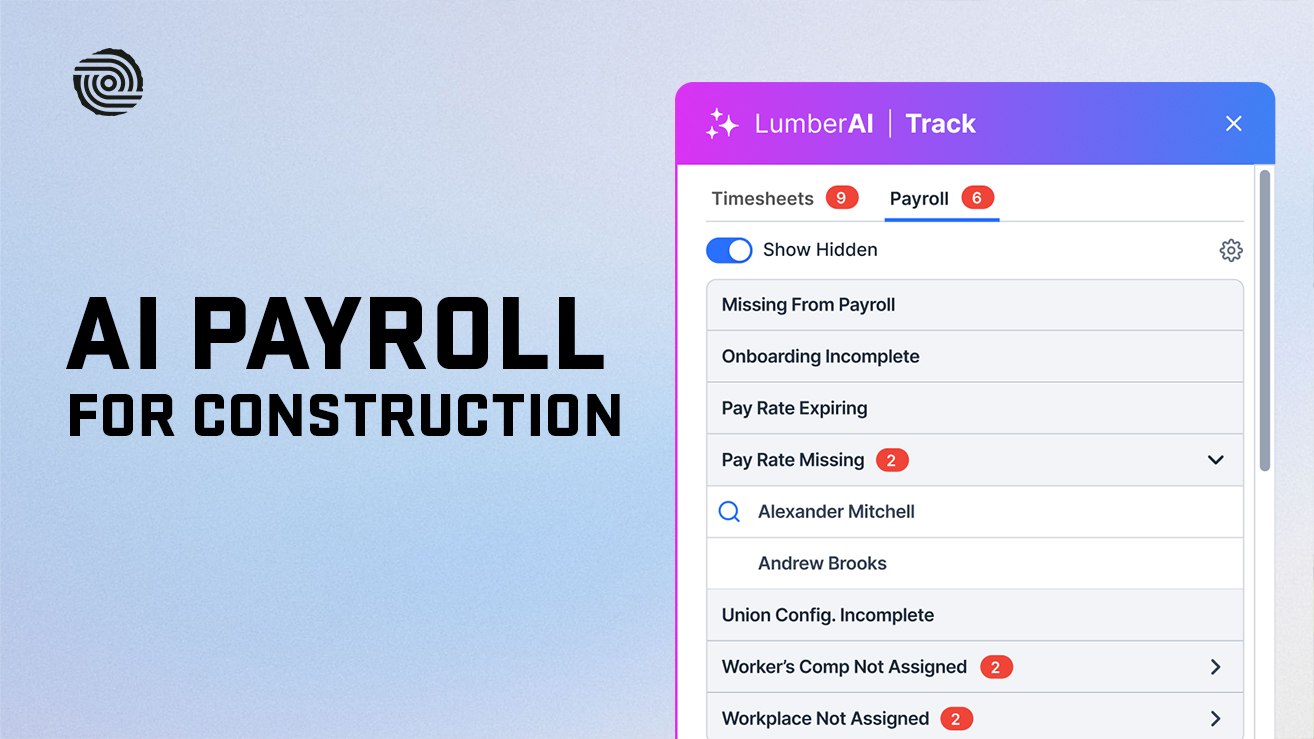


Every week, someone at your company signs a certified payroll report that says, under penalty of federal law, that every worker on a public job was paid correctly. The signature is easy. The math behind it is not.
One electrician logged under the wrong trade classification. One bonus left out of the overtime rate. One fringe contribution credited to the wrong plan. Any of these can turn a clean-looking WH-347 into back wages, withheld contract payments, or a debarment proceeding. On top of that, the old version of the federal WH-347 form expired on September 30, 2026, so contractors still running legacy templates now face a reporting gap as well.
This is where AI construction payroll software earns its place. Not as a replacement for the people who understand prevailing wage rules, but as a second set of eyes that checks every timesheet, rate, and fringe line before a paycheck or report goes out.
This guide is written for construction company owners and operations leaders, the people who carry the risk when payroll goes wrong, and for the payroll and compliance teams who report to them. You will learn where compliance risk actually hides in construction payroll, how AI construction payroll software checks wage, hour, tax, and union rules before errors reach a paycheck, what AI cannot do for you, and how to evaluate a system before you trust it with your Statement of Compliance.
Key Takeaways
- AI-powered construction payroll software uses rule engines, pattern detection, and document reading to check wage, hour, tax, and union rules before payroll runs and before certified payroll reports are submitted.
- Most construction compliance failures start upstream: a wrong trade classification, a missing timesheet split, a bonus left out of the regular rate, or a fringe credited incorrectly.
- On Davis-Bacon work, the signer of each weekly Statement of Compliance faces penalties under 18 U.S.C. 1001, including fines and up to 5 years in prison, so accuracy before signing matters more than speed.
- DOL enforcement cases repeatedly show the same patterns: misclassified trades, falsified or incomplete certified payrolls, and overtime rates that ignore bonuses. Prime contractors can be held responsible for subcontractor underpayments.
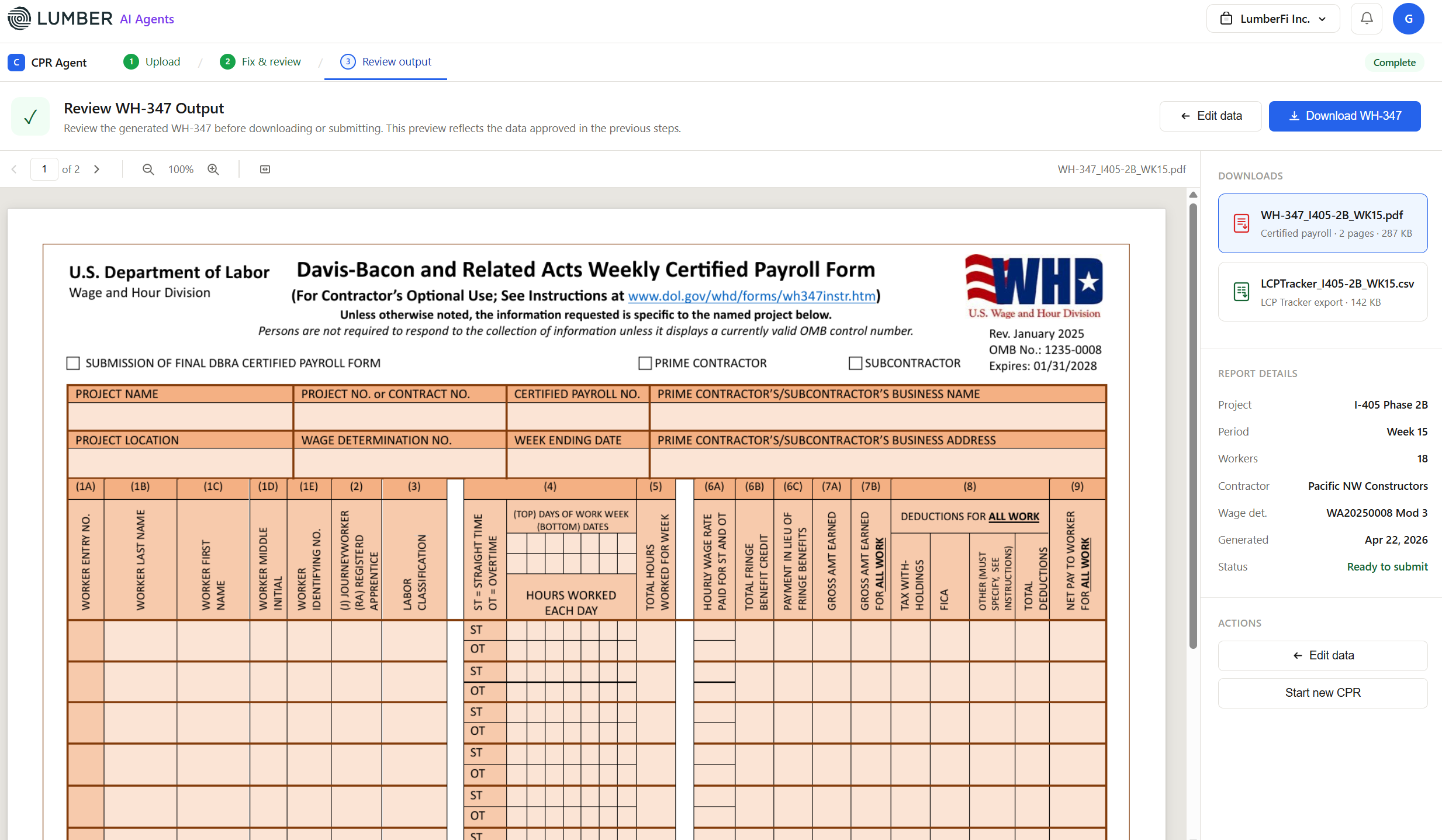
- The revised WH-347 (OMB control number valid through January 31, 2028) adds fields for wage determination numbers, registered apprentices, fringe credits, and cash in place of fringe. Payroll systems need to capture that data at the source.
- A 2026 court order vacated three provisions of the 2023 Davis-Bacon rule, but the rest of that rule, including stronger withholding and debarment provisions, still applies.
- AI does not transfer liability. The employer remains responsible for accurate records and correct pay, so every AI flag needs a named human reviewer and a documented decision.
- The strongest results come from AI payroll built for construction that connects field time capture to payroll and job costing and keeps a full audit trail.
What Is AI Construction Payroll Software?
AI construction payroll software is payroll software built for contractors that uses artificial intelligence to read, check, and flag payroll data automatically, catching errors before workers are paid or reports are filed. In construction, that means checking hours, trade classifications, wage rates, fringes, and overtime against the rules that apply to each project, each worker, and each jurisdiction.
Traditional payroll automation repeats the same calculation every pay period. If the input is wrong, it produces a wrong paycheck faster. AI payroll adds a review layer that asks whether the input makes sense before the calculation runs.
In practice, AI payroll for construction combines three capabilities.
1. Rules-based compliance validation
The system holds the rules for each job: the wage determination, any collective bargaining agreement (CBA), federal and state overtime rules, and apprentice ratio requirements. The system checks every timesheet line against those rules. Compliance math should be deterministic and traceable to a source rule, not guessed. AI helps by mapping messy inputs (job titles, cost codes, crew notes) to the right rule.
2. Payroll anomaly detection
Anomaly detection compares the current payroll against each worker's history and the crew's patterns. It flags what a person scanning 300 lines on a Friday afternoon would miss: a journeyworker suddenly paid at an apprentice rate, a fringe amount that dropped to zero, or hours that don't match the daily report.
3. Document intelligence
Construction payroll still runs on documents: paper timesheets, CBA rate sheets, wage determinations from SAM.gov, and state prevailing wage schedules. AI can read these documents and turn them into structured data, removing a major source of manual keying errors.
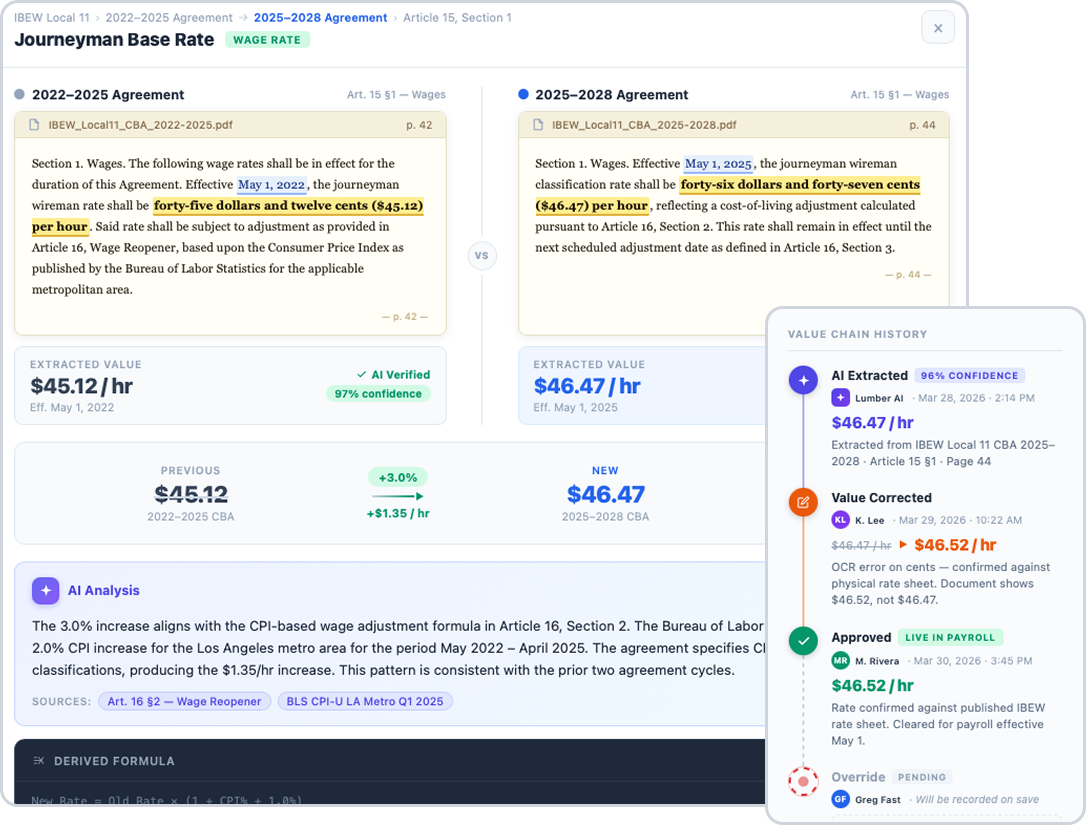
Lumber, for example, builds these capabilities into AI agents that sit inside its construction payroll platform: a Paper Timecard Agent that converts photographed timesheets into payroll data, a Union Agent that reads CBAs and rate sheets, and a Prevailing Wage Agent that scans certified payroll reports for compliance risks before submission. The pattern applies to any system you evaluate: AI should check the work, and a qualified person should approve it.
The Four Rule Sets AI Construction Payroll Software Checks
Labor law compliance in construction is not one rulebook. It is four overlapping rule sets: wage, hour, tax, and union. Each can change by project, state, and union local, and AI construction payroll software checks all four on every timesheet line.
The table below shows what each rule set covers and an example of the check it drives.
Wage and hour checks get most of the attention, and the next sections cover them in detail. Tax and union rules deserve the same care, because errors there are just as costly and harder to unwind.
Tax rules: where the crew works changes what you owe
Construction crews often work in more than one state or locality in a single pay period. Withholding depends on both the work location and the worker's residence, plus any state tax reciprocity agreement between the two states. Fringe treatment matters too: cash fringe is taxable wages, while bona fide plan fringe generally is not.
AI construction payroll software determines the tax jurisdictions for each work location and flags a new location that needs a tax account before the first payroll runs there. It also tracks deposit deadlines, since IRS penalties for late federal deposits range from 2% to 15% of the unpaid amount depending on how late the deposit is. Tax rules vary by state and locality, so confirm requirements for each place you work.
Union rules: one crew, several agreements
Union contractors may work under several CBAs at once, each with its own wage rates, fringe funds, dues, and effective dates. When a member works outside the home local, union reciprocity rules can route fringe contributions back to the home local's funds.
AI construction payroll software reads CBAs and rate sheets, applies the right agreement to each hour worked, and reconciles contributions by fund before remittance reports go out. When a negotiated rate increase takes effect mid-project, the new rate applies on its effective date instead of waiting for someone to update a spreadsheet.
Where Compliance Risk Hides in Construction Payroll
Most payroll violations in construction are not caused by bad intent. They come from data that was wrong before payroll ever ran: a foreman's best guess at a trade classification, a timesheet that lumped two kinds of work together, or a rate sheet that was updated but never loaded.
Construction is harder than most industries for three reasons. Crews move between jobs with different wage determinations in the same week. One worker can perform several trade classifications on one project. And fringe benefits can be paid as cash fringe (taxable wages) or as bona fide plan fringe (contributions to a qualifying plan), which changes both the prevailing wage credit and the tax treatment.
The table below maps the most common risk areas to the rule involved and the typical consequence when it goes wrong.
Only the last row is a pure payroll processing problem. The rest start in the field, in the job setup, or in how rules were loaded. That is why AI payroll has the most impact when it checks data at the source, not just at the end of the pay cycle.
Compliance note: Many states run their own prevailing wage programs with different rates, forms, and filing systems. Requirements vary by state, so confirm the rules for each project's location.
How AI Payroll Reduces Compliance Risk at Each Step
AI payroll cuts risk by moving error detection earlier. Instead of finding a problem when an agency reviewer or DOL investigator does, the system flags it while it is still a data entry fix. Here is how that works across a typical construction pay cycle.
Step 1: Job setup and wage determinations
Every prevailing wage job starts with the wage determination in the contract. The WH-347 instructions require contractors to list each wage determination number and revision that applied to work in the pay period. DOL guidance also notes that modifications issued after contract award generally do not apply to that contract.
AI payroll helps by reading wage determinations and CBA rate sheets, loading the correct rates for each trade classification and county, and locking them to the project. It flags when a project has no rate for a classification a crew is about to work, which is when the conformance process should start, not after payroll.
Step 2: Time capture in the field
The timesheet is the source document for everything that follows. If a worker spends four hours framing and four hours on concrete, and the timesheet shows eight hours of "general labor," no payroll engine can fix that later. DOL's WH-347 instructions are clear: without an accurate breakdown of hours by classification, the worker must be paid the highest applicable rate for all hours.
AI-assisted time tracking prompts crews to pick a cost code and trade classification at clock-in, uses geofencing to confirm the jobsite, and converts photographed paper timesheets into structured data. Timesheet review rules then flag missing splits, missing breaks where state law requires them, and hours that do not match the daily report.
Step 3: Rate validation before payroll runs
Before payroll is approved, the system checks each line against the rules for that worker, job, and week:
- Base rate at or above the wage determination or CBA rate for the classification worked.
- Overtime calculated on the correct regular rate, including non-discretionary bonuses.
- Blended rate overtime (the weighted average rate) when one worker earns different rates in the same workweek.
- Overtime over 40 hours per week on contracts covered by the Contract Work Hours and Safety Standards Act (CWHSSA), plus any state daily overtime rules.
- Apprentices registered in an approved program and within the allowed apprentice ratio.
Anomaly detection adds a second layer. It compares this week to each worker's history and flags sudden rate drops, missing fringes, or unusual hour patterns for review.
Step 4: Fringe benefit reconciliation
On Davis-Bacon work, the fringe obligation can be met with bona fide plan fringe, cash fringe, or a combination. The two are treated differently. Bona fide plan contributions can be credited toward the prevailing wage. Cash fringe counts as taxable wages and is reported separately on the revised WH-347.
AI payroll reconciles fringe dollars by worker, plan, and hour so the credit claimed on the certified payroll report matches what was actually contributed. It also flags credits claimed for unfunded plans, which require prior DOL approval.
Step 5: Certified payroll validation before submission
The revised WH-347 asks for more detail than the old form, including worker entry numbers, journeyworker or registered apprentice status, wage determination numbers, total fringe credit, and cash paid instead of fringe. Before the Statement of Compliance is signed, AI validation can confirm that:
- Every worker with hours on the jobsite appears on the report.
- Hours, rates, deductions, and net pay tie back to the payroll register.
- The required checkboxes in the Statement of Compliance match the facts.
- The output format fits the agency's submission system.
Step 6: Taxes, records, and the audit trail
After payroll, the risk shifts to tax deposits and recordkeeping. Construction crews often cross state and local tax lines, which makes jurisdiction determination and timely tax deposits harder to get right. AI-driven monitoring can flag a deposit at risk of being late or a new work location that triggers a new tax account.
Just as important, a good system logs every change, who approved it, and why. When an investigator asks how a rate was set or why an hour was reclassified, that log would have the answers.
What DOL Enforcement Cases Show About Construction Payroll Risk
The best way to understand construction payroll risk is to look at the patterns the DOL Wage and Hour Division finds again and again. The three patterns below come from DOL enforcement actions against construction contractors. Each one maps to a specific payroll check.
Pattern 1: Bonuses left out of overtime
In one investigation, DOL found that a contractor with a large hourly workforce left incentive bonuses out of the regular rate of pay. Every worker who earned a bonus and worked more than 40 hours in a week was shorted on the overtime premium.
This is a calculation error, not a field error, and it repeats on every paycheck until someone catches it. A regular rate rule that automatically adds non-discretionary bonuses to the overtime base is exactly the kind of check AI payroll runs on every line.
Pattern 2: Electricians paid as laborers
On a Davis-Bacon covered housing project, DOL found that a contractor classified workers who performed electrical work as laborers and paid them the lower laborer rate. The contractor owed the difference between the two rates, plus fringes, for every affected hour.
Trade classification mapping, which compares the work recorded on the timesheet to the classifications in the wage determination, is designed to flag this pattern before payroll runs.
Pattern 3: The prime contractor paid for a subcontractor's errors
On a federally funded construction project, DOL found that a subcontractor did not pay required prevailing wages and fringes, and that its certified payroll records had been falsified. DOL collected the back wages from the prime contractor, because the prime was responsible for its subcontractors' compliance with the Davis-Bacon contract clauses.
For general contractors, this is the key lesson. Reviewing subcontractor certified payroll reports with automated checks for missing workers, rates below the wage determination, and fringe gaps is part of protecting your own contract.
The table below summarizes the three patterns.
None of these findings required a sophisticated scheme to uncover. They are the kind of pattern a consistent, automated review is built to surface every week.
What AI Payroll Cannot Do for You
AI payroll reduces risk. It does not transfer it. The legal responsibility for correct pay and accurate records stays with the employer, and on federal work, with the person who signs the Statement of Compliance.
The signer still owns the certification
DOL's WH-347 instructions state that the Statement of Compliance is subject to 18 U.S.C. 1001, which carries a fine, up to 5 years in prison, or both. The instructions also say the person signing should know the facts they are certifying. An AI review supports that knowledge. It does not replace it.
There is no AI safe harbor
In April 2024, DOL issued Field Assistance Bulletin 2024-1 on artificial intelligence and automated systems under the Fair Labor Standards Act (FLSA). DOL has since withdrawn that bulletin. The withdrawal removed AI-specific guidance, not the underlying duties. Employers must still keep accurate records of hours and wages and pay what the law requires, whatever tools they use.
Judgment calls still need people
Some decisions are not pattern matching. They need a qualified person, and sometimes the contracting agency or DOL:
- Whether a task fits an existing classification or needs a conformance request
- Whether a benefit plan qualifies as bona fide for fringe credit
- How to read ambiguous CBA language on shift premiums, show-up pay, or travel
- Whether a worker is an employee or an independent contractor
Wrong inputs still produce wrong outputs
If a supervisor picks the wrong cost code every day, AI can flag the pattern, but someone has to fix the habit. The best results come when field teams understand why the classification prompt matters.
Build human review into the workflow
Use these practices to keep AI payroll defensible:
- Assign a named reviewer for every flag category, such as classification, fringe, and overtime.
- Require a written reason for every override, and store it in the system.
- Run parallel payrolls before go-live and compare results line by line.
- Sample a few certified payroll reports each month for manual review, even when no flags fired.
- Re-test rules whenever a new wage determination, CBA, or state rule takes effect.
This is also why many contractors pair software with specialists. Lumber, for instance, backs its AI agents with LumberCare, a managed services team of CPAs and prevailing wage specialists, for the decisions where experience matters most.
2026 Regulatory Changes Your Payroll System Must Reflect
AI payroll is only as current as the rules loaded into it. Three developments in 2025 and 2026 affect how construction payroll systems should be configured.
The revised WH-347 is now the standard
DOL released a revised WH-347 in January 2025. Its OMB control number (1235-0008) is valid through January 31, 2028. Payroll providers reported, based on DOL communications, that the prior version of the form carried a September 30, 2026 expiration date.
The revised form asks for data many legacy systems never captured, including:
- Worker entry numbers, with one row per classification when a worker performs more than one.
- Journeyworker (J) or registered apprentice (RA) status, with the apprentice's level of progression.
- Every wage determination number and revision that applied during the week.
- Total fringe benefit credit, broken out by plan name, type, number, and funded or unfunded status.
- Cash paid instead of fringe benefits, reported in its own column.
- Phone number and email address of the certifying official.
WH-347 itself is optional, but weekly certified payroll is not. If you use another format, it must contain the same information, and the Statement of Compliance must use identical wording.
Three 2023 Davis-Bacon provisions were vacated
On June 24, 2026, the U.S. District Court for the Northern District of Texas vacated three provisions of DOL's 2023 Davis-Bacon rule nationwide, in a case brought by the Associated General Contractors of America (AGC). DOL did not oppose the final judgment. The vacated provisions had:
- Extended coverage to certain materials suppliers operated by contractors or subcontractors
- Applied Davis-Bacon requirements to delivery truck drivers who spend limited time on the jobsite
- Applied Davis-Bacon requirements "by operation of law" to contracts missing the required clauses
The rest of the 2023 rule remains in effect. That includes the expanded recordkeeping requirements, cross-contract withholding, the lower standard for debarment with a mandatory three-year period, and the revised method for setting prevailing wages. A separate legal challenge to that wage-setting method is still in the courts.
Worker classification rules are under revision
In February 2026, DOL proposed a rule to rescind its 2024 independent contractor regulation under the FLSA and replace it with a framework focused on control and opportunity for profit or loss. Treat this as a moving target. Configure your onboarding and payroll checks around the rule in effect when you hire, and confirm whether a final rule has been published.
Compliance note: Prevailing wage and classification rules change often, and state rules may differ from federal ones. Verify current requirements with DOL, the contracting agency, or your state labor department before relying on any rule set.
What Lower Compliance Risk Means for Owners and Operations Leaders
For owners and operations leaders, construction payroll compliance is not a back-office detail. It affects cash flow, the work you can bid, and how much of your team's week goes to fixing problems instead of running jobs.
- Cash flow: On federal and federally assisted work, contract payments can be withheld to cover suspected underpayments. Under the 2023 Davis-Bacon rule, withholding can reach across other contracts with the same contractor.
- Bidding eligibility: Davis-Bacon debarment now carries a mandatory three-year period, which keeps a contractor off federal work for that time.
- Prime contractor exposure: General contractors can be held responsible for back wages their subcontractors owe.
- Back-office rework: Every error found after payday means a retro payment, a corrected certified payroll report, and sometimes amended tax filings. Catching errors before payroll runs removes that rework. Lumber reports that its platform cuts payroll processing time by 95%.
- One view of the workforce: When time tracking, payroll, HR, and job costing share the same data, operations leaders see labor cost by job as work happens. That is the practical case for construction workforce management platforms over stand-alone payroll tools for contractors.
In short, fewer payroll errors mean steadier cash flow, protected bidding eligibility, and a back office that spends its time on the next job instead of the last one.
How to Choose AI Construction Payroll Software
Many payroll tools for contractors now advertise AI. For construction compliance, what matters is where the AI checks your data and whether it understands prevailing wage, union, and multi-state rules.
The table below compares four common payroll setups on the checks that most affect compliance risk.
The biggest difference is timing. A check that runs after workers are paid creates a correction, a retro payment, and possibly an amended report. A check that runs before payroll prevents the error.
Questions to ask any AI payroll vendor
Use this checklist in demos. Ask the vendor to show each item with your own data, not a sample file.
- Does it load federal wage determinations from SAM.gov and state prevailing wage schedules, by project and county?
- Can it hold CBA rates, fringes, and union reciprocity rules for each local you work with?
- Does it flag classification mismatches at time capture, before payroll is approved?
- Does it calculate blended rate overtime and include non-discretionary bonuses in the regular rate?
- Does it separate cash fringe from bona fide plan fringe for both prevailing wage credit and tax?
- Does it produce the revised WH-347 and the state certified payroll formats you file?
- Does it check apprentice registration and apprentice ratios?
- Can you see why each flag fired, with the source rule cited?
- Does it log every override with the user, time, and reason?
- Does it sync with your accounting system or ERP so job costing matches payroll?
- Who supports you when a flag needs a judgment call?
How to Implement AI Payroll Without Adding New Risk
A rushed rollout can introduce the same errors you were trying to remove. These steps keep the transition controlled.
- Audit your last 90 days of payroll. Pull a sample of certified payroll reports and union remittances. Note where errors occurred: classification, overtime, fringe, or reporting. This becomes your baseline and your first set of rules to test.
- Clean your master data. Confirm each worker's trade classification, apprentice registration, union local, home address, and tax setup. AI cannot validate against bad reference data.
- Load rules project by project. Enter each active wage determination with its revision number, each CBA rate sheet, and each state rule. Have a second person verify the loaded rates against the source documents.
- Start at the source. Roll out field time capture with cost codes and classifications before you switch payroll. Train supervisors on why the prompts matter.
- Run parallel payrolls. Run at least two pay cycles in both the old and new systems. Reconcile every difference to a cause.
- Set flag ownership. Assign a reviewer for each flag type and define a turnaround time, so flags are cleared before payroll cutoff.
- Review subcontractor reports. If you are a prime contractor, apply the same validation to subcontractor certified payroll reports you receive.
- Measure results. Track flags raised, flags confirmed, post-payroll corrections, and agency questions received. Fewer post-payroll corrections are the clearest sign the system is working.
Common mistakes to avoid
- Treating AI flags as optional. Ignoring a flag without a documented reason looks worse in an investigation than no flag at all.
- Automating a broken process. If timesheets do not capture classification splits, AI will only report the gap faster.
- Using "fringe" without qualifying it. Cash fringe and bona fide plan fringe are taxed differently. Set them up as separate pay items.
- Letting rates go stale. CBA rates change on set dates, and new wage determinations apply to new contracts. Assign someone to watch for updates.
- Forgetting state rules. Federal checks alone will miss state daily overtime, state prevailing wage forms, and state filing systems.
Frequently Asked Questions
What is AI construction payroll software?
AI construction payroll software is payroll software for contractors that uses artificial intelligence to check hours, trade classifications, wage rates, fringes, and overtime against each job's rules before payroll runs. It combines three functions: rules-based validation against wage determinations and CBAs, anomaly detection that compares each payroll to past patterns, and document reading that turns paper timesheets and rate sheets into structured data. The goal is to catch errors while they are still simple data fixes, instead of after workers are paid or a certified payroll report is filed. In construction, the value comes from understanding prevailing wage, union, and multi-state rules, which general payroll tools often handle only through add-ons or manual work.
How is AI construction payroll software different from payroll automation?
Payroll automation repeats the same calculation every pay period based on the data it receives. It speeds up payroll but does not question the input, so a wrong trade classification or a missing hour split produces a wrong paycheck faster. AI construction payroll software adds a review layer before it runs the calculation. It checks each timesheet line against the wage determination, CBA, overtime rules, and tax rules for that job, compares the payroll against past patterns, and flags anything unusual for a person to review. In short, payroll automation handles volume, and AI handles the checks that used to depend on someone catching an error by eye.
Can AI payroll guarantee Davis-Bacon compliance?
No. AI payroll can significantly reduce errors, but it cannot guarantee compliance. The contractor remains responsible for paying correct prevailing wages and fringes and for submitting accurate weekly certified payrolls. The person signing the Statement of Compliance is subject to 18 U.S.C. 1001 and should know the facts being certified. AI also cannot make certain judgment calls, such as whether work requires a conformance request or whether a benefit plan qualifies as bona fide. Think of AI payroll as a consistent reviewer that checks every line every week, paired with a qualified person who approves the results and documents decisions on anything flagged.
How does AI payroll catch trade classification errors?
AI payroll compares what the timesheet says a worker did, including the cost code, task, and crew, against the trade classifications in the project's wage determination or CBA. If a worker logged electrical tasks but is set up to be paid as a laborer, the system flags the mismatch before payroll is approved. It can also flag workers whose classification changed suddenly, or timesheets that show one classification for a full day when the crew's work suggests a split. DOL guidance says that without an accurate breakdown of hours by classification, all hours must be paid at the highest applicable rate, so catching missing splits early protects both workers and contractors.
Who is liable if AI payroll makes a mistake?
The employer. Using software, including AI, does not shift legal responsibility for wages, overtime, or recordkeeping to the vendor. DOL previously issued guidance on AI and automated systems under the FLSA and has since withdrawn it. Still, the underlying obligations did not change: employers must keep accurate records and pay what the law requires. On federal and federally assisted projects, prime contractors can also be held responsible for subcontractor underpayments. Your vendor contract may address service errors, but it will not change what DOL or a court can require of you. That is why human review, documented overrides, and a complete audit trail matter.
Does AI payroll work with union payroll and CBAs?
It can, if the system is built for construction. Union payroll involves CBA wage rates, fringe contributions to multiple funds, working dues, shift premiums, travel and subsistence rules, and union reciprocity when members work outside their home local. AI helps by reading CBAs and rate sheets, loading the rates and fringes by classification, and flagging when a payroll line does not match the agreement. It also helps reconcile fringe contributions by fund and hour so remittance reports match payroll. Ask any vendor to load one of your actual CBAs during a demo and show how the system handles a rate increase that takes effect mid-project.
What should contractors look for in AI construction payroll software?
Look for software that checks data at the source, not just at the end of the pay cycle. Key capabilities include loading federal and state wage determinations by project, holding CBA rates and fringes, validating trade classifications at time capture, calculating blended-rate overtime correctly, separating cash fringe from bona fide plan fringe, and generating revised WH-347 and state certified payroll formats. Every flag should cite the rule behind it, and every override should be logged. Construction-specific platforms, such as Lumber, combine these checks with field time tracking, job costing, and integrations with construction accounting systems, keeping payroll and project data consistent.
Do I need to replace my accounting system to use AI payroll?
Usually not. Many construction AI payroll platforms connect to existing accounting systems and ERPs, so validated payroll data, labor costs, and general ledger entries sync back to the system you already use. That matters because job costing depends on payroll data being coded correctly. Before you commit, confirm the specific integration for your system, what data flows in each direction, and how often it syncs. Also ask whether certified payroll reports are generated from the same payroll data or rebuilt in a separate tool, since a separate rebuild introduces another place for errors.
Final Thoughts
Construction payroll compliance rarely fails at the payroll calculation itself. It fails earlier, when a trade classification is guessed, hours are not split, a bonus is left out of the regular rate, or a fringe is credited to the wrong plan. DOL enforcement cases show these patterns producing significant back wage findings, and prime contractors paying for their subcontractors' mistakes.
AI construction payroll software cuts that risk by checking wage, hour, tax, and union rules on every line at the point where errors start, then validating certified payroll reports before the Statement of Compliance is signed. It does not remove the employer's responsibility, and it does not replace the judgment of people who understand prevailing wage and union rules. It gives them a consistent, documented review every week.
Practical next steps for contractors:
- Confirm your certified payroll process uses the revised WH-347 fields, or a format with identical information.
- Review your last three months of certified payroll reports for classification splits, overtime rates, and fringe credits.
- Check that your rules reflect the June 2026 Davis-Bacon court order and the parts of the 2023 rule still in effect.
- Use the vendor checklist above to evaluate whether your current system checks data before payroll or only after.
- Assign named reviewers and document every override.
If you want to see how this works on your own data, Lumber's construction workforce management platform combines field time tracking, prevailing wage and union payroll, AI agents that review timesheets and certified payroll reports before submission, and support from LumberCare's prevailing wage specialists. Lumber also offers a free AI audit tool that scans a certified payroll report for compliance issues, which is a simple way to test your current process.
Speak to a Lumber expert to see how our AI agents catch payroll compliance errors before payday.
Lorem ipsum dolor sit amet, consectetur adipiscing elit. Donec ullamcorper mattis lorem non. Ultrices praesent amet ipsum justo massa. Eu dolor aliquet risus gravida nunc at feugiat consequat purus. Non massa enim vitae duis mattis. Vel in ultricies vel fringilla.
Introduction
Mi tincidunt elit, id quisque ligula ac diam, amet. Vel etiam suspendisse morbi eleifend faucibus eget vestibulum felis. Dictum quis montes, sit sit. Tellus aliquam enim urna, etiam. Mauris posuere vulputate arcu amet, vitae nisi, tellus tincidunt. At feugiat sapien varius id.
Eget quis mi enim, leo lacinia pharetra, semper. Eget in volutpat mollis at volutpat lectus velit, sed auctor. Porttitor fames arcu quis fusce augue enim. Quis at habitant diam at. Suscipit tristique risus, at donec. In turpis vel et quam imperdiet. Ipsum molestie aliquet sodales id est ac volutpat.


Ipsum sit mattis nulla quam nulla. Gravida id gravida ac enim mauris id. Non pellentesque congue eget consectetur turpis. Sapien, dictum molestie sem tempor. Diam elit, orci, tincidunt aenean tempus. Quis velit eget ut tortor tellus. Sed vel, congue felis elit erat nam nibh orci.

Dolor enim eu tortor urna sed duis nulla. Aliquam vestibulum, nulla odio nisl vitae. In aliquet pellentesque aenean hac vestibulum turpis mi bibendum diam. Tempor integer aliquam in vitae malesuada fringilla.
Elit nisi in eleifend sed nisi. Pulvinar at orci, proin imperdiet commodo consectetur convallis risus. Sed condimentum enim dignissim adipiscing faucibus consequat, urna. Viverra purus et erat auctor aliquam. Risus, volutpat vulputate posuere purus sit congue convallis aliquet. Arcu id augue ut feugiat donec porttitor neque. Mauris, neque ultricies eu vestibulum, bibendum quam lorem id. Dolor lacus, eget nunc lectus in tellus, pharetra, porttitor.
Ipsum sit mattis nulla quam nulla. Gravida id gravida ac enim mauris id. Non pellentesque congue eget consectetur turpis. Sapien, dictum molestie sem tempor. Diam elit, orci, tincidunt aenean tempus. Quis velit eget ut tortor tellus. Sed vel, congue felis elit erat nam nibh orci.
Mi tincidunt elit, id quisque ligula ac diam, amet. Vel etiam suspendisse morbi eleifend faucibus eget vestibulum felis. Dictum quis montes, sit sit. Tellus aliquam enim urna, etiam. Mauris posuere vulputate arcu amet, vitae nisi, tellus tincidunt. At feugiat sapien varius id.
Eget quis mi enim, leo lacinia pharetra, semper. Eget in volutpat mollis at volutpat lectus velit, sed auctor. Porttitor fames arcu quis fusce augue enim. Quis at habitant diam at. Suscipit tristique risus, at donec. In turpis vel et quam imperdiet. Ipsum molestie aliquet sodales id est ac volutpat.
Mi tincidunt elit, id quisque ligula ac diam, amet. Vel etiam suspendisse morbi eleifend faucibus eget vestibulum felis. Dictum quis montes, sit sit. Tellus aliquam enim urna, etiam. Mauris posuere vulputate arcu amet, vitae nisi, tellus tincidunt. At feugiat sapien varius id.
Eget quis mi enim, leo lacinia pharetra, semper. Eget in volutpat mollis at volutpat lectus velit, sed auctor. Porttitor fames arcu quis fusce augue enim. Quis at habitant diam at. Suscipit tristique risus, at donec. In turpis vel et quam imperdiet. Ipsum molestie aliquet sodales id est ac volutpat.
- Lectus id duis vitae porttitor enim gravida morbi.
- Eu turpis posuere semper feugiat volutpat elit, ultrices suspendisse. Auctor vel in vitae placerat.
- Suspendisse maecenas ac donec scelerisque diam sed est duis purus.
Lectus leo massa amet posuere. Malesuada mattis non convallis quisque. Libero sit et imperdiet bibendum quisque dictum vestibulum in non. Pretium ultricies tempor non est diam. Enim ut enim amet amet integer cursus. Sit ac commodo pretium sed etiam turpis suspendisse at.
Tristique odio senectus nam posuere ornare leo metus, ultricies. Blandit duis ultricies vulputate morbi feugiat cras placerat elit. Aliquam tellus lorem sed ac. Montes, sed mattis pellentesque suscipit accumsan. Cursus viverra aenean magna risus elementum faucibus molestie pellentesque. Arcu ultricies sed mauris vestibulum.

Critical Construction Compliance | Awareness Week
Mar 16, 2026
Apr 15, 2026
Nov 30, 2026
Dec 15, 2026
Essential resources for contractors