How to Fill Out a WH-347 Form Correctly (Step-by-Step)



A single missing digit on a certified payroll report can hold up a federal draw request for weeks. Contracting officers do not chase down clarifications on their own schedule. They flag the payroll, kick it back, and the contractor waits while the project timeline keeps moving. For a general contractor juggling multiple Davis-Bacon jobs, that kind of delay compounds fast.
The WH-347 is the form most contractors use to meet that weekly reporting requirement. It looks straightforward until you are staring at nine columns per worker, a Statement of Compliance with six checkboxes, and a wage determination number you have to get exactly right. The U.S. Department of Labor also released a revised version of the form in January 2025, so contractors who learned the old layout now have new fields to account for.
This guide walks through the current WH-347, column by column, so payroll staff and project managers can complete it correctly the first time. It covers who needs to file it, what changed in the 2025 revision, the hard deadline for switching over, and the mistakes that most often trigger a rejected submission. If you already know the form changed and want the field-by-field mechanics of filling it out correctly, this is written for that.
Key Takeaways
- The WH-347 is the standard weekly certified payroll form for contractors and subcontractors working on Davis-Bacon and Related Acts (DBRA) construction contracts.
- Using Form WH-347 is optional, but submitting weekly certified payroll information is mandatory for covered contractors under 29 CFR 3.3 and 5.5(a)(3)(ii) and the Copeland Act.
- DOL released a revised WH-347 in January 2025 with new fields, including Worker Entry Number, a Journeyworker/Registered Apprentice column, and Wage Determination Number.
- The legacy WH-347 expires September 30, 2026. After that date, only the revised form (valid through January 31, 2028) is accepted for federal certified payroll reporting.
- Every worker entry needs an identifying number, never a full Social Security number.
- Workers who move between labor classifications during the week need a separate row for each classification worked.
- Page 2’s Statement of Compliance must be signed under penalty of the false statements statute, 18 U.S.C. 1001.
- Boxes 1, 2, 3, and 6 on the Statement of Compliance must always be checked. Boxes 4 and 5 apply only when apprentices or fringe benefit credits are involved.
- Common rejection causes include missing wage determination numbers, unsigned statements, and fringe benefit math that does not tie back to page 2.
What Is Form WH-347 and Who Has to File It
Form WH-347 is the Department of Labor’s standard template for certified payroll reports on federal and federally assisted construction contracts. The Davis-Bacon and Related Acts apply to contractors and subcontractors performing on federal or federally assisted contracts in excess of $2,000 for construction, alteration, or repair, and require them to pay locally prevailing wages, including fringe benefits. The WH-347 is how contractors document that they did it.
The form itself is technically optional. What is not optional is the underlying reporting requirement. The Copeland Act requires contractors on federally financed construction contracts to furnish a weekly statement of wages paid to each employee, and DOL regulations require that statement to be submitted to the contracting agency every week the contractor works on the project. Most contractors use the WH-347 because it already satisfies every field the regulations require. If you build your own payroll template instead, it has to carry identical wording to the official Statement of Compliance on page 2 of the WH-347.
This applies to prime contractors and every tier of subcontractor performing labor on the jobsite, not just the company holding the direct contract with the federal agency.
What Changed in the 2025 Revised WH-347
DOL updated the WH-347 in January 2025 to close reporting gaps and reduce common errors. Before you fill out a payroll, confirm you are working from the current version, since the layout and some field labels changed.
The revised form is more granular, which means more chances to leave a field blank by accident. Reviewing the layout before your first submission on a new project saves rework later.
Deadline: The Old WH-347 Expires September 30, 2026
This is the detail that changes the urgency of switching over. The legacy WH-347 carries an OMB control number that expires on September 30, 2026. After that date, the old form is no longer valid for certified payroll submissions on federal or federally assisted construction contracts. The revised 2025 version carries its own OMB control number, valid through January 31, 2028.
At the time of publishing, that leaves roughly ten weeks before the old form stops being accepted. A few practical implications follow from that date:
- Any contractor still generating payroll from an old template, spreadsheet macro, or software configuration needs to confirm that setup is updated before October 1, 2026.
- Individual contracting agencies and project administrators can require the new form earlier than the federal deadline, so check with your contracting officer rather than assuming you have until September.
- Subcontractors on your project need the same notice you do. A prime contractor’s own payroll can be fully updated while a second-tier subcontractor is still submitting on the old layout, which creates a compliance gap the prime is ultimately responsible for catching.
Waiting until the deadline to test the new form against real project data is the wrong order of operations. Run a live payroll through the revised WH-347 now, while there is still room to fix a misconfigured field before it becomes a rejected submission on an active federal job.
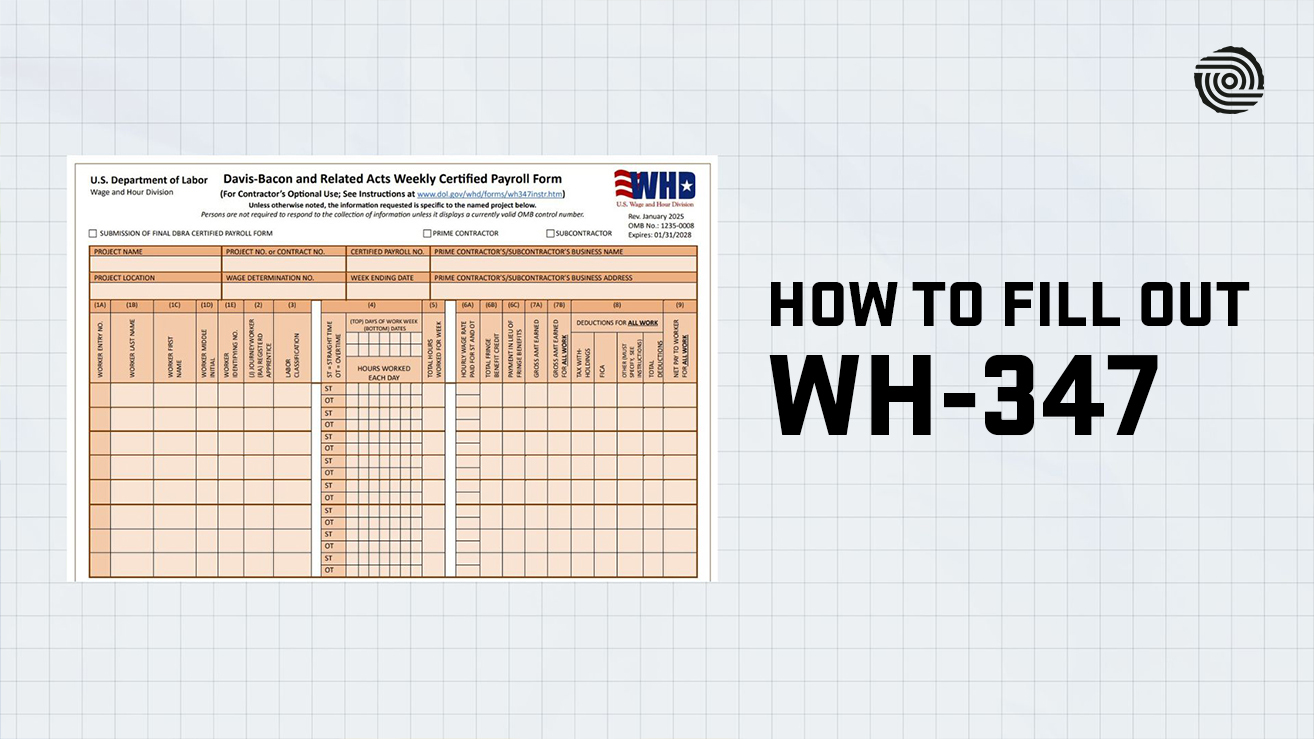
Step-by-Step: Filling Out Page 1 of the WH-347
Header Information
Start with the top of the form. Check the box if this is the final certified payroll for the project, and check whether you are filing as the prime contractor or a subcontractor. Then complete the identifying fields.
- Project Name and Project No. or Contract No.: Use the exact names and numbers from the contract documents.
- Certified Payroll No.: Number sequentially starting at 1 for the first week worked on the project, and never reuse or skip numbers.
- Prime Contractor’s/Subcontractor’s Business Name and Address: Use the legal business name and full address.
- Project Location: Give the full site address, or at minimum the county and state if there is no street address.
- Wage Determination No.: List every wage determination number and revision that applied to the work performed during the pay period. If multiple determinations applied, list all of them.
- Week Ending Date: The last day of the workweek being reported.
Columns 1A Through 1E: Worker Information
Each worker gets a worker entry number, starting at 1 and continuing sequentially down the payroll, even across multiple pages. If a worker performs work in more than one labor classification during the week, that worker keeps the same entry number on every row but gets a separate row per classification.
Column 1E asks for an identifying number. Use the last four digits of the Social Security number or another worker-specific identifier. Full Social Security numbers must never appear on the form.
Column 2: Journeyworker or Registered Apprentice
Enter “J” for journeyworker or “RA” for registered apprentice. For apprentices, also note their level of progression in the approved apprenticeship program. This column is new to the 2025 revision and is easy to overlook if you are used to the older layout.
Column 3: Labor Classification
List the classification for the work the employee actually performed, pulled directly from the wage determination attached to the contract. If a worker performed more than one classification during the week, break out the hours by classification on separate rows. If the wage determination has no classification that matches the work performed, contact the contracting officer before submitting the payroll. Do not guess.
Column 4 and 5: Hours Worked
Label each day of the contractor’s workweek across the top of the grid and record the corresponding date underneath. Log straight time and overtime hours separately for each day, then total them in Column 5. On contracts covered by the Contract Work Hours and Safety Standards Act, hours over 40 in the week count as overtime, including hours worked off the jobsite on the covered contract.
Columns 6A Through 6C: Rates and Fringe Benefits
Column 6A holds the actual hourly rate paid for straight time and overtime. This should never be lower than the prevailing wage rate on the determination, though it can be higher. Do not include cash paid in lieu of fringe benefits in this column.
Column 6B is the fringe benefit credit, calculated as hours worked multiplied by the hourly credit claimed on page 2. Column 6C is any cash paid directly to the worker instead of fringe benefits, calculated the same way. If you mix funded fringe benefits with cash in lieu, both columns get used.
Columns 7 Through 9: Earnings, Deductions, and Net Pay
Column 7A is gross wages earned on this specific project for the week. Column 7B is gross wages earned across all jobs that week, including non-covered work, if the worker split time. Column 8 breaks out deductions for tax withholding, FICA, and other categories, with a total. Any deduction that does not fall under the categories permitted without prior approval in 29 CFR 3.5 needs Department of Labor sign-off before it is taken. Column 9 is the worker’s net pay across all work for the week.
Step-by-Step: Completing Page 2 (Statement of Compliance)
Page 2 repeats the project identifiers, then requires the certifying official’s name, title, and signature. This is the section that carries legal weight. It is subject to 18 U.S.C. 1001, the federal false statements statute, which carries penalties of a fine, up to five years imprisonment, or both for knowingly false certifications.
There are six checkboxes. Boxes 1, 2, and 3, plus box 6, must always be checked, since they certify basic compliance with DBRA requirements. Box 4 applies only if apprentices worked during the period, in which case you also list each apprenticeship program name and whether it is registered with DOL’s Office of Apprenticeship or a State Apprenticeship Agency. Box 5 applies if you are claiming an hourly credit for fringe benefit contributions, and requires you to list each plan name, type, funding status, and the hourly credit claimed per worker.
If you are meeting your fringe benefit obligation entirely through cash paid to the worker, check box 5 but leave the detail section blank, since that amount already appears in Column 6C on page 1.
Common Mistakes That Get Certified Payrolls Rejected
- Blank wage determination numbers. Reviewers cannot verify pay rates without knowing which determination applies.
- Full Social Security numbers on the form. This is a data privacy violation and an automatic rejection.
- Mismatched fringe benefit math. Column 6B on page 1 has to tie directly to the hourly credit listed on page 2.
- Unsigned or undated Statement of Compliance. Photocopied or scanned signatures do not meet the requirement. DOL’s own instructions for the form specify that a legally valid electronic signature is acceptable, but a photocopy or scanned image of a signature is not (see the WH-347 instructions source listed below).
- Skipping the apprentice detail when box 4 is checked. If any worker is paid as an apprentice, the program name and registration status must appear.
- One row per worker regardless of classification changes. If a worker performed two classifications in one week, that worker needs two rows.
Frequently Asked Questions
Is Form WH-347 mandatory for every construction contract?
No. It applies specifically to contractors and subcontractors performing on federal or federally assisted construction contracts covered by the Davis-Bacon and Related Acts, generally contracts over $2,000. Using the WH-347 template itself is optional, but submitting the underlying weekly certified payroll information is required by regulation for covered contracts. Contractors can use another format instead, as long as it captures identical information and the Statement of Compliance wording matches the official form exactly.
How often does a certified payroll need to be submitted?
Weekly, for every week the contractor or subcontractor has employees performing covered work on the project. This continues until the contractor’s work on the project is complete, at which point the final submission should be marked as the final certified payroll.
What happens if the fringe benefit calculations don’t match between page 1 and page 2?
The submission is likely to be flagged and returned. Column 6B on page 1 must equal the worker’s total hours multiplied by the hourly fringe credit claimed for that worker on page 2. Reviewers check this relationship closely because it is where errors and, occasionally, underpayment attempts show up.
Can a contractor pay a higher rate than the wage determination requires?
Yes. The wage determination sets a floor, not a ceiling. If a worker is paid more than the required rate, Column 6A should reflect the actual rate paid, not the minimum rate listed on the determination.
Do subcontractors submit their own WH-347, or does the prime contractor submit for everyone?
Each contractor and subcontractor performing covered work submits its own certified payroll. The prime contractor is typically responsible for collecting and forwarding subcontractor payrolls to the contracting agency, but each entity certifies its own data.
Final Thoughts
The WH-347 rewards precision more than speed. Wage determination numbers, worker classifications, and fringe benefit math all need to tie together cleanly, and the Statement of Compliance carries real legal weight once it is signed. Contractors who build a consistent weekly process, confirm they are using the current 2025 version of the form, and double-check the fringe benefit tie-out before submitting tend to avoid the back-and-forth that slows down payment on federal work.
For contractors running certified payroll across several active projects, doing this by hand every week adds up fast, and a single transposed number can hold up a draw. lumberfi’s payroll platform builds Davis-Bacon and prevailing wage requirements directly into the certified payroll workflow, so classifications, fringe calculations, and the Statement of Compliance stay accurate without a manual cross-check every Friday.
Lorem ipsum dolor sit amet, consectetur adipiscing elit. Donec ullamcorper mattis lorem non. Ultrices praesent amet ipsum justo massa. Eu dolor aliquet risus gravida nunc at feugiat consequat purus. Non massa enim vitae duis mattis. Vel in ultricies vel fringilla.
Introduction
Mi tincidunt elit, id quisque ligula ac diam, amet. Vel etiam suspendisse morbi eleifend faucibus eget vestibulum felis. Dictum quis montes, sit sit. Tellus aliquam enim urna, etiam. Mauris posuere vulputate arcu amet, vitae nisi, tellus tincidunt. At feugiat sapien varius id.
Eget quis mi enim, leo lacinia pharetra, semper. Eget in volutpat mollis at volutpat lectus velit, sed auctor. Porttitor fames arcu quis fusce augue enim. Quis at habitant diam at. Suscipit tristique risus, at donec. In turpis vel et quam imperdiet. Ipsum molestie aliquet sodales id est ac volutpat.


Ipsum sit mattis nulla quam nulla. Gravida id gravida ac enim mauris id. Non pellentesque congue eget consectetur turpis. Sapien, dictum molestie sem tempor. Diam elit, orci, tincidunt aenean tempus. Quis velit eget ut tortor tellus. Sed vel, congue felis elit erat nam nibh orci.

Dolor enim eu tortor urna sed duis nulla. Aliquam vestibulum, nulla odio nisl vitae. In aliquet pellentesque aenean hac vestibulum turpis mi bibendum diam. Tempor integer aliquam in vitae malesuada fringilla.
Elit nisi in eleifend sed nisi. Pulvinar at orci, proin imperdiet commodo consectetur convallis risus. Sed condimentum enim dignissim adipiscing faucibus consequat, urna. Viverra purus et erat auctor aliquam. Risus, volutpat vulputate posuere purus sit congue convallis aliquet. Arcu id augue ut feugiat donec porttitor neque. Mauris, neque ultricies eu vestibulum, bibendum quam lorem id. Dolor lacus, eget nunc lectus in tellus, pharetra, porttitor.
Ipsum sit mattis nulla quam nulla. Gravida id gravida ac enim mauris id. Non pellentesque congue eget consectetur turpis. Sapien, dictum molestie sem tempor. Diam elit, orci, tincidunt aenean tempus. Quis velit eget ut tortor tellus. Sed vel, congue felis elit erat nam nibh orci.
Mi tincidunt elit, id quisque ligula ac diam, amet. Vel etiam suspendisse morbi eleifend faucibus eget vestibulum felis. Dictum quis montes, sit sit. Tellus aliquam enim urna, etiam. Mauris posuere vulputate arcu amet, vitae nisi, tellus tincidunt. At feugiat sapien varius id.
Eget quis mi enim, leo lacinia pharetra, semper. Eget in volutpat mollis at volutpat lectus velit, sed auctor. Porttitor fames arcu quis fusce augue enim. Quis at habitant diam at. Suscipit tristique risus, at donec. In turpis vel et quam imperdiet. Ipsum molestie aliquet sodales id est ac volutpat.
Mi tincidunt elit, id quisque ligula ac diam, amet. Vel etiam suspendisse morbi eleifend faucibus eget vestibulum felis. Dictum quis montes, sit sit. Tellus aliquam enim urna, etiam. Mauris posuere vulputate arcu amet, vitae nisi, tellus tincidunt. At feugiat sapien varius id.
Eget quis mi enim, leo lacinia pharetra, semper. Eget in volutpat mollis at volutpat lectus velit, sed auctor. Porttitor fames arcu quis fusce augue enim. Quis at habitant diam at. Suscipit tristique risus, at donec. In turpis vel et quam imperdiet. Ipsum molestie aliquet sodales id est ac volutpat.
- Lectus id duis vitae porttitor enim gravida morbi.
- Eu turpis posuere semper feugiat volutpat elit, ultrices suspendisse. Auctor vel in vitae placerat.
- Suspendisse maecenas ac donec scelerisque diam sed est duis purus.
Lectus leo massa amet posuere. Malesuada mattis non convallis quisque. Libero sit et imperdiet bibendum quisque dictum vestibulum in non. Pretium ultricies tempor non est diam. Enim ut enim amet amet integer cursus. Sit ac commodo pretium sed etiam turpis suspendisse at.
Tristique odio senectus nam posuere ornare leo metus, ultricies. Blandit duis ultricies vulputate morbi feugiat cras placerat elit. Aliquam tellus lorem sed ac. Montes, sed mattis pellentesque suscipit accumsan. Cursus viverra aenean magna risus elementum faucibus molestie pellentesque. Arcu ultricies sed mauris vestibulum.

Critical Construction Compliance | Awareness Week
Mar 16, 2026
Apr 15, 2026
Nov 30, 2026
Dec 15, 2026
Essential resources for contractors