Construction Payroll Process

Certified Payroll Reporting Process:
‍A Step-by-Step Guide for Construction Contractors

Certified payroll reports are weekly proof that you paid every worker the right rate. This guide walks through the full process, from project setup to signed submission.

What is the certified payroll reporting process?

The certified payroll reporting process is the weekly workflow contractors and subcontractors on Davis-Bacon and state prevailing wage projects follow to prove every worker earned the required rate. You report hours, trade classification, wages, fringe benefits, and deductions on Form WH-347 or a state form, sign a Statement of Compliance, and submit it to the prime contractor or awarding agency.

Overview

What Is the Certified Payroll Reporting Process?

Certified payroll is where field records meet federal and state law. Every hour a crew logs on a covered project has to land on a weekly report, tied to the right trade classification and the right wage determination. The certified payroll reporting process is how that happens, week after week, until the job closes out. It sits inside the broader construction payroll process and runs on top of your prevailing wage setup.

Who files

Who has to file certified payroll

Every contractor and subcontractor with laborers on a covered project. That means federal construction contracts over $2,000, federally assisted projects covered by the Related Acts, and state or local prevailing wage jobs.

Who receives it

Who receives the report

The prime contractor is responsible for making sure certified payrolls from every subcontractor, at every tier, reach the contracting or funding agency. Subcontractors submit through the process set up for the project, and some agencies require direct upload to their own portal.

Why it's different

How it differs from regular payroll

Regular payroll shows that each employee got paid. Certified payroll shows that each worker earned at least the prevailing wage for the classification they actually worked, with rates, fringe benefits, and a signed Statement of Compliance to prove it.

Step by step

Certified Payroll Reporting Process, Step by Step

Eight steps take you from contract award to an audit-ready file. Most rejected reports trace back to a gap in the first four, long before anyone fills out a form.

  1. Before the job

    Confirm the project requires certified payroll

    Check the contract for Davis-Bacon or state prevailing wage clauses, trace the funding source, and find the attached wage determination. Federal funding passed through a state or local government can trigger Related Acts requirements, so verify the funding statute and labor standards clauses.

    What goes wrong here: a subcontractor learns the job was covered at the first pay application, then rebuilds weeks of reports from memory.
  2. Before the job

    Set up the project

    Load the wage determination number and its modification, the county, every trade classification you expect to use, and how you will meet fringe obligations: bona fide plan fringe, cash fringe, or both. Note overtime and apprentice ratio rules too.

    What goes wrong here: the project is set to the wrong wage determination modification, so every rate on every report is off.
  3. Every day

    Capture hours by worker, trade classification, project, and day

    Classification follows the duties actually performed. A journeyman who runs a mini-excavator in the morning and lays pipe in the afternoon may work two trade classifications in one day. Timesheets need to show that split. See how multi-time capture modes handle it.

    What goes wrong here: the whole day is logged to one trade classification, and the worker is underpaid for the higher-rated work.
  4. Every week

    Run payroll and tie it out

    Covered workers must be paid weekly, and gross pay, deductions, and net pay on the report must match the payroll register to the cent. Overtime hours still earn the full prevailing wage, including fringe benefits. The extra half-time premium applies to the basic hourly rate, not the fringe benefit component, and qualifying cash in lieu of fringe can be left out of it.

    What goes wrong here: a manual adjustment hits the payroll register after the report is built, and the two no longer tie.
  5. Every week

    Complete the WH-347 or the state form

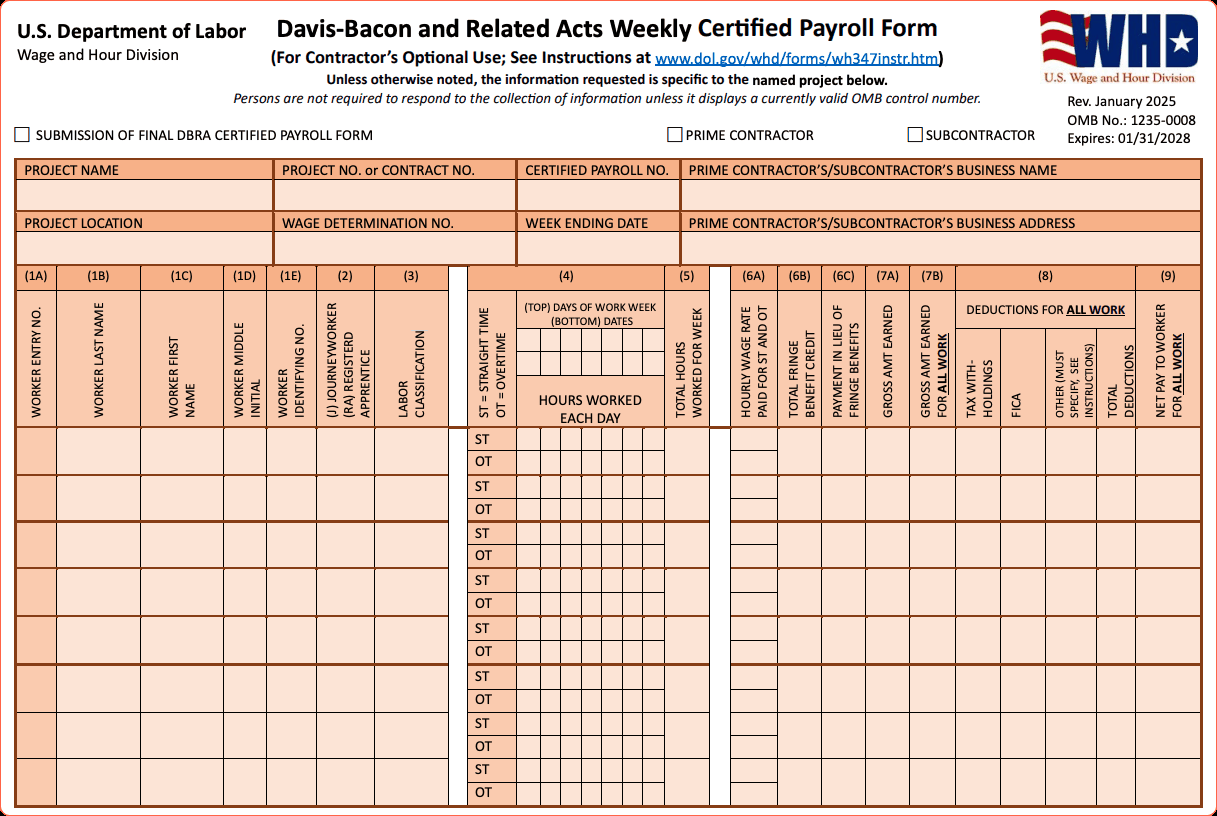
    Federal projects use the revised WH-347 (Rev. January 2025), OMB Control No. 1235-0008, which expires January 31, 2028. Always download the latest version from the Department of Labor. State projects may require their own form or a portal upload.

    What goes wrong here: an old template saved on a shared drive gets used, and the report is rejected.

    What each section of the WH-347 needs

    Using the WH-347 is optional, but any format you submit must carry every field below and the Statement of Compliance. Keep full Social Security numbers and contact details in your own payroll records; the weekly report carries only what the form asks for.

    Hover or tap any part of the form to see what goes there. Switch pages with the tabs.

    Revised WH-347, Rev. January 2025 (OMB 1235-0008, expires 01/31/2028). Blank form shown for reference. Always download the current version from the Department of Labor.

    FieldSectionWhat to enterWatch for
    TopFinal submission and roleTick “Submission of final DBRA certified payroll form” on the last report you file for the project, and nowhere else. Then mark whether you’re the prime contractor or a subcontractor.Ticking the final box early, or still writing “final” in the payroll number field the way the old form worked.
    HeaderProject and business detailsThe project name and project or contract number exactly as the contract shows them, the job location, your certified payroll number (start at 1 and go up by one each week), every wage determination number that applies, the week ending date, and your legal business name and address.A trade classification code entered where the wage determination number belongs, or a gap in the payroll numbering.
    1AWorker entry no.A line number for each worker. If one person worked under two classifications this week, they take two rows that share the same entry number.Giving the same worker a new number on their second row.
    1B–1DWorker nameLast name, first name and middle initial, spelled the way they appear in your payroll records.Nicknames or spellings that don’t match the payroll register.
    1EWorker identifying no.A short identifier: the last four digits of the Social Security number or your employee ID.A full Social Security number on a report that may be shared or released.
    2Journeyworker or apprenticeJ for a journeyworker. RA only for an apprentice individually registered in a program recognized by the DOL Office of Apprenticeship or a State Apprenticeship Agency.Marking a helper or trainee as RA without a registration behind it, which means paying below the journeyworker rate.
    3Labor classificationThe classification from the wage determination that matches the work done. Split a worker across rows when they did work in more than one classification.Internal titles like “Lead” or “Foreman” instead of the wage determination’s wording.
    4Hours worked each dayFill the dates across the top, then each worker’s actual hours per day: straight time on the ST line, overtime on the OT line.Overtime folded into the ST line, or hours rounded (7.5 entered as 8).
    5Total hours for the weekThe week’s straight-time total and overtime total, kept on their own lines.Totals that don’t add up from the daily boxes.
    6AHourly wage rate (ST and OT)The rate you actually paid for straight time and for overtime, even when it’s above the minimum. Cash paid in place of fringe benefits stays out of this column.An overtime rate that adds half-time on top of the fringe as well as the base rate.
    6BTotal fringe benefit creditThe credit you’re taking for contributions to bona fide plans: the worker’s total hours times the hourly credit you list for them on page 2.A number that doesn’t tie to the total hourly credit on page 2.
    6CPayment in lieu of fringe benefitsAny fringe paid to the worker as cash on the check: hours worked times the cash fringe rate.Cash fringe hidden inside 6A or the gross pay columns, so the worker looks underpaid.
    7AGross amount earned (this project)What the worker earned on this project this week, worked out from the hours in column 5 and the rates in 6A.A gross figure that can’t be rebuilt from the hours and rates on the same row.
    7BGross amount earned (all work)The worker’s gross pay for everything they worked that week, on this job, other public jobs and private work. If this project was their only work, it matches 7A.7B copied from 7A when the worker also put in time on another job.
    8Deductions for all workTax withholdings, FICA and other deductions for the whole week’s pay, each in its own column, with a total at the end. Explain anything under “Other” in the remarks on page 2.One lump-sum deduction, or an “Other” amount nobody explained.
    9Net pay for all workThe worker’s take-home pay for the whole week, after every deduction. It should match the paycheck and the payroll register.Net pay for this project only, or a figure that doesn’t match the register.

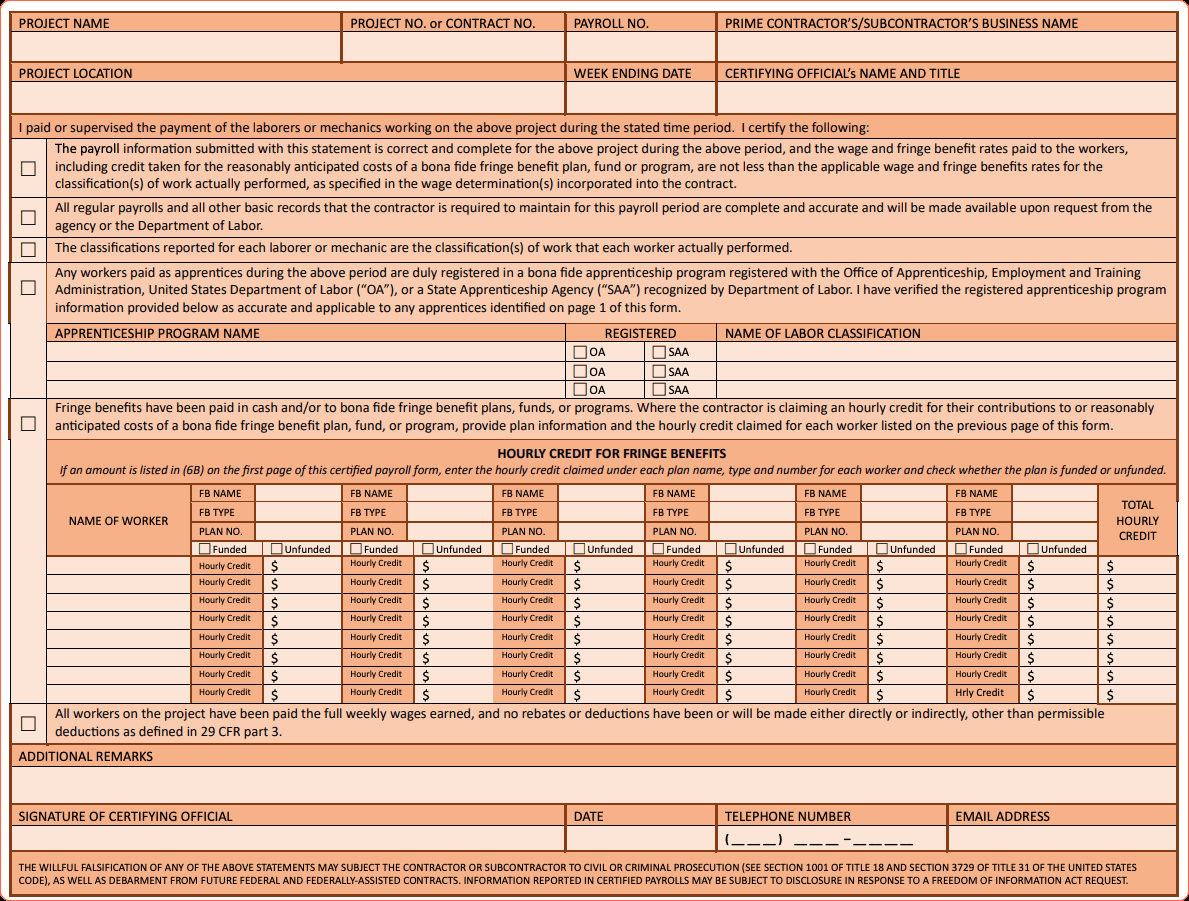
    Page 2 now carries the Statement of Compliance and the fringe benefit detail. It must be signed every week.

    FieldSectionWhat to enterWatch for
    HeaderProject details and certifying officialRepeat the project name and number, payroll number, business name, location and week ending date exactly as they read on page 1. Add the name and title of the person who paid or supervised payment of the crew.A payroll number or week ending date that differs from page 1.
    CertifyPayroll, records and classificationsThree statements to check: the wages and fringe paid meet the wage determination for the work actually performed, your basic payroll records are complete and available on request, and every worker is reported under the classification they actually worked.Ticking the boxes out of habit before anyone has compared the report to the wage determination.
    ApprenticesApprenticeship programsIf anyone was paid as an apprentice, tick the box and list each program by name, whether it’s registered with the Office of Apprenticeship (OA) or a State Apprenticeship Agency (SAA), and the labor classification it covers.Apprentice rates paid to someone whose program, ratio or registration can’t be shown.
    FringeHourly credit for fringe benefitsTick the fringe statement, then for each worker list every plan you’re taking credit for: the plan name, its type, the plan number, whether it’s funded (contributions go to a trust or third party) or unfunded (paid from your own assets), and the hourly credit. Total the credits in the last column.A total hourly credit that doesn’t match column 6B, or cash fringe entered here instead of in 6C.
    Full payFull wages, no kickbacksConfirm every worker received their full weekly wages, with no rebates and no deductions beyond those 29 CFR part 3 permits.Deductions for tools, equipment or advances that the regulation doesn’t allow.
    RemarksAdditional remarksShort notes that help a reviewer read the report: what an “Other” deduction is, why a report was corrected or resubmitted, or anything else unusual this week.Corrected numbers sent in with no explanation.
    SignSignature and contact detailsThe certifying official signs and dates the form and adds a phone number and email the agency or prime contractor can use for follow-up questions.A missing signature, or a signer who didn’t pay or supervise the payroll.
    WarningFalsification noticeNo entry needed. It’s a reminder that willful false statements can lead to civil or criminal prosecution and debarment, and that certified payrolls can be released under a FOIA request.Treating the signature as a formality.
Not sure if your CPR will pass?Run it through Lumber's free AI audit before you submit.
Audit my report, free →
  1. Every week

    Sign the Statement of Compliance

    The contractor, or an authorized agent who pays or supervises wage payments, signs it, and must be able to verify the classifications, hours, wages, and fringe benefits. A legally valid electronic signature works where the submission system supports it. Falsifying it can lead to civil or criminal prosecution.

    What goes wrong here: the statement is missing, unsigned, signed by the wrong person, or doesn't match how fringe benefits were actually paid.
  2. Every week

    Submit on schedule, including no-work weeks

    Federal reports are due for each week covered work is performed, within seven days after the regular pay date for that payroll period. Federal rules don't generally require a report for weeks with no covered work, but many states, awarding bodies, and contracts do, and state schedules differ.

    What goes wrong here: a no-work report the contract requires goes unfiled, the payroll numbers skip, and the agency flags the file as incomplete.
  3. After the job

    Retain records and respond to reviews

    Keep payrolls, timesheets, apprenticeship records, and fringe benefit documentation for at least three years after all work on the prime contract is completed. Some states, contracts, or benefit funds require longer. When an agency or prime contractor asks questions, answer from the source records.

    What goes wrong here: records are split across the field, the office, and a prior payroll provider when the auditor calls.
Compliance

Certified Payroll Compliance Requirements

Certified payroll requirements come from two places: federal law and the state where the work happens. On many jobs, both apply at once.

Requirements at a glance
  • Pay at least the wage determination rate, including fringe benefits, for the classification of work actually performed.
  • Pay covered workers weekly, with overtime for hours over 40; the half-time premium applies to the basic hourly rate.
  • Submit a certified payroll report every week covered work is performed.
  • Sign a Statement of Compliance with each report.
  • Employ apprentices only under qualifying registered apprenticeship programs and within the approved ratio.
  • Keep records for at least three years after all work on the prime contract is completed.
  • Post the wage determination and the Davis-Bacon poster (WH-1321) at the jobsite.
Federal

Federal requirements (Davis-Bacon and Related Acts)

The Davis-Bacon Act covers federal construction contracts over $2,000. The Related Acts apply the same labor standards to federally assisted projects, with coverage set by each funding statute. Contractors must pay wage determination rates weekly, file weekly certified payroll, and post the wage determination and the WH-1321 poster at the jobsite. Apprentices must be individually registered (or in an eligible probationary period), work within the ratio, and get the program's wage and fringe schedule.

State

State-specific requirements

Many states run their own prevailing wage programs, often called "Little Davis-Bacon" laws, with their own forms, thresholds, portals, and deadlines. California requires DIR registration and electronic certified payroll for most covered public works, generally at least monthly, with some small projects exempt. Don't assume federal weekly deadlines apply. See certified payroll by state and the 2026 State Prevailing Wage Compliance Guides.

Deadlines

Submission frequency and deadlines

Federal reports are due for each week covered work is performed, within seven days after the regular pay date for the payroll period. State deadlines vary (California's is generally monthly), and contracts can set stricter dates.

Federal due-date check
Report due by Fri, Nov 20, 2026
Certification

Statement of Compliance

The signed certification on each report, signed by the contractor or an authorized agent who pays or supervises wage payments. It confirms the payroll is complete and accurate, and identifies how fringe benefits were provided: to bona fide plans, as cash fringe, or both.

Records

Record retention

Davis-Bacon requires records to be kept for three years after all work on the prime contract is completed. Many states, contracts, and benefit funds require longer, so set retention to the strictest rule that applies.

Avoid these

Common Certified Payroll Mistakes Contractors Make

Most rejected reports come down to the same five errors. None of them are hard to fix once you know where to look.

1

Missing or incorrect Statement of Compliance

What happens and why

An unsigned or incomplete statement can get the submission rejected or delay processing, and depending on the contract and agency, payment may be withheld until it's resolved. It happens when page two is treated as a formality or signed by someone who doesn't pay or supervise wage payments.

Fix

Make the signature a required step before submission, and confirm the fringe certification matches how benefits were actually paid.

2

Wrong fringe columns (cash fringe vs. bona fide plan fringe)

What happens and why

Report fringe benefits the wrong way and a correctly paid worker can look underpaid. It happens because one worker can receive both: part to a bona fide plan, part as cash fringe on the check, and cash wages above the basic rate can also count toward fringe obligations.

Fix

Set the fringe method per trade classification at project setup, and document how every dollar is credited.

3

Wrong trade classification or outdated wage determination

What happens and why

This is the mistake that turns into back wages. Workers must be paid for the classification of work actually performed, not their internal job title, and wage determinations get modified. More on the prevailing wage payroll process.

Fix

Map every role to a wage determination classification at setup, and confirm which modification applies.

4

Totals that don't tie (gross pay, deductions, net pay)

What happens and why

When the report and the payroll register disagree, reviewers stop trusting both. It usually follows a manual edit, an off-cycle check, or a void and reissue after the report was built.

Fix

Reconcile the report to the payroll register line by line before anyone signs.

5

Late submission or skipped no-work weeks

What happens and why

Late reports can delay processing and payment, and gaps in payroll numbering make a file look incomplete. It happens when nobody owns a submission calendar per project.

Fix

Track federal and state due dates by project, and file no-work reports wherever the state, agency, or contract requires them; federal rules generally don't.

For a deeper look, read why certified payroll reports get rejected.

How Lumber helps

How Lumber Automates the Certified Payroll Reporting Process

Every step above depends on the one before it. Lumber connects them, field to back office, so your certified payroll report is built from the same records that ran payroll.

Prevailing wage rates built in and validated

Lumber's compliance engine applies rates by wage determination, trade classification, and county, then checks every line against them. Not guessed, not manually entered.

Reports generated from approved timesheets

Crews clock in by project and trade classification on the jobsite. Approved timesheets flow straight into payroll and onto the WH-347 or your state's form. Nobody types the same hours twice.

Errors flagged before you submit

LumberAI catches rate mismatches, totals that don't tie, and missing fields before the Statement of Compliance gets signed. Want to see it on your own report?

Records stored and audit-ready

Every payroll, timesheet, and signed report is stored by project. If the auditor asks, you're ready. And when the stakes are highest, LumberCare's prevailing wage specialists are a call away.

FAQ

Frequently Asked Questions

Quick answers to the questions contractors ask most about certified payroll.

How do you process certified payroll?

Start before the first payroll: confirm the project is covered and load the wage determination and trade classifications. Then, each week, capture hours by trade classification, run payroll, tie the report to the payroll register, complete the WH-347 or state form, sign the Statement of Compliance, and submit on time. See the construction payroll process hub.

Who has to submit certified payroll reports?

Every contractor and subcontractor with laborers or mechanics on a covered project. That includes federal construction contracts over $2,000 under the Davis-Bacon Act, federally assisted projects under the Related Acts, and state and local prevailing wage projects. The prime contractor is responsible for making sure payrolls from all lower tiers reach the agency. More on the prevailing wage payroll process.

How often must certified payroll reports be submitted?

Weekly on federal projects: each report is due within seven days after the regular pay date, for every week covered work is performed. Federal rules don't generally require a report for weeks with no covered work, but some states, agencies, and contracts do. State schedules vary; California's is generally monthly.

What goes into a certified payroll report (WH-347)?

Project and contractor details, every applicable wage determination and revision number, and for each worker: name, identifying number, classification, apprentice status, daily and total hours, hourly and overtime rates, total fringe benefit rate, gross pay, itemized deductions, and net pay. The Statement of Compliance identifies the fringe benefit plans and contributions.

What is a Statement of Compliance?

The Statement of Compliance is the signed certification on each certified payroll report. The contractor, or an authorized agent who pays or supervises wage payments, attests that the payroll is accurate and complete and that every worker received at least the required wages and fringe benefits. Falsifying it can lead to civil or criminal prosecution.

What happens if a certified payroll report is late or rejected?

A missing or incorrect report usually brings a request for correction and can delay payment; depending on the contract, the agency may withhold it. Underpayment found in review creates back wage liability. Serious or repeated violations can lead to investigation and debarment. See why certified payroll reports get rejected.

Need help with your certified payroll reporting?

Talk to a Lumber certified payroll specialist about your projects, forms and deadlines.